

A busy trading firm in Dubai
Meet the owner of Gulf Star Trading (example). Business is good. Quotes go out from Outlook every day, invoices follow, the phone keeps ringing. The team is busy, and nobody has time to chase.
AI follow-ups for Gulf SMBs
Recover checks your quotes, invoices and email threads for the money nobody chased, then drafts the follow-up in your tone. You approve. It sends from your own mailbox.
1,000 of 1,000 early-access codes left
All early-access codes are claimed. Join the newsletter for the next offer.
Found this month
AED 66,700
Chapter 01 · The problem
A short story about a busy company, told with example data. If it sounds familiar, you are not alone: this is how most revenue leaks.
Meet the owner of Gulf Star Trading (example). Business is good. Quotes go out from Outlook every day, invoices follow, the phone keeps ringing. The team is busy, and nobody has time to chase.
Forgotten quote
Desert Rose Interiors asked for a price. Quotation QT-2026-031 for AED 46,000 went out. Then nothing: no reply, no follow-up, for 36 days.
Overdue invoice
Al Noor Trading LLC received invoice INV-000101 for AED 12,500. The due date passed 41 days ago. Finance meant to send a reminder. Next week. Then the week after.
Dormant customer
A customer who used to reorder every few weeks has not ordered in four months. No complaint, no goodbye. Just silence, and nobody noticed.
Contract renewal
A maintenance contract ends at the end of the month. The date sits in a spreadsheet somewhere. Nobody has called, and a competitor might.
Unanswered enquiry
A new company asked for a price. The email landed in a shared inbox, and everyone assumed someone else had answered it.
The turn
Recover found the quote and the invoice, showed the evidence behind each one and drafted both follow-ups. The owner approved them in under a minute from the Companion. Both emails went out from the company's own mailbox.
These were never lost deals. They were follow-up gaps.
Chapter 02 · The business cycle
From the first enquiry to the repeat order, every customer passes through five hand-offs. Each one is a follow-up someone has to remember. Choose a stage to see what goes wrong and how Recover helps.
Stage 1 of 5
Enquiries arrive by email, phone, website and referral. Each one needs a fast answer with a price or a meeting.
Stage 2 of 5
You send the quotation, follow up, answer questions and close the deal.
Stage 3 of 5
The won customer moves to onboarding and delivery, and the invoice is raised.
Stage 4 of 5
Invoices go out with 30 to 90 day terms, and someone has to collect.
Stage 5 of 5
Renewals, repeat orders and reactivation. Customers who are looked after also refer the next lead, and the cycle starts again.
Chapter 03 · Why customers quit
These are the reasons customers give when they cancel. Turn each card to see what it looks like, what to do about it and where Recover fits. Then read the one reason they almost never say out loud.
Too expensive
The price feels higher than the value they remember.
Turn the cardLooks like: discount requests, or orders that stop after a price change.
What to do: show the value delivered before you talk about renewal.
Recover: flags renewals before the end date with a draft for you to approve, and guardrails keep any discount within your limit.
Didn't see the value
They stopped using it, and nobody showed them what they were getting.
Turn the cardLooks like: fewer orders, fewer replies, no questions.
What to do: regular check-ins with proof of value.
Recover: flags regular customers who have gone quiet and drafts the check-in.
Missing features
They needed something you did not offer, or did not know you offered.
Turn the cardLooks like: a request in an email that never got an answer.
What to do: reply honestly, and follow up when things change.
Recover: unanswered enquiries surface with a reply draft, so no request sits silent.
Switched to another service
A competitor called at the right moment. You did not.
Turn the cardLooks like: orders moving elsewhere, often near a renewal date.
What to do: reach out before the contract ends, not after.
Recover: flags contracts near their end date with no renewal in progress, plus "win back" team missions.
Poor customer service
Emails waited days for an answer.
Turn the cardLooks like: the same question asked twice, then silence.
What to do: answer every enquiry, fast and in their language.
Recover: lists unanswered emails with a draft in English or Arabic, ready to approve.
Too complex
They got lost between onboarding and the first result.
Turn the cardLooks like: stalled onboarding and open questions.
What to do: one named contact and one clear next step.
Recover: Reva briefs the account manager before every follow-up: what is open for that customer and why it was flagged.
Low quality
Something went wrong, and nobody came back to fix it.
Turn the cardLooks like: a complaint, a return, or quiet after delivery.
What to do: ask, fix, and confirm in writing.
Recover: cannot fix quality, but it makes sure the follow-up after a complaint is not forgotten.
"They never heard from us."
No follow-up, no check-in, no proof of value. In B2B services it is the most common silent reason, and customers rarely say it out loud.
Turn the cardLooks like: nothing at all. That is the problem.
What to do: make every follow-up someone's job, every week.
Recover: the five leaks it finds are exactly these missing follow-ups, each with a draft waiting for you.
Chapter 04 · Retention economics
Two findings from long-running business research explain why follow-up matters more than another marketing campaign.
+5% retention25–95%
Increasing customer retention by 5% increases profits by 25% to 95%.
Source: Frederick F. Reichheld, Bain & Company, "Prescription for cutting costs" (2001); Reichheld & Sasser, "Zero Defections: Quality Comes to Services", Harvard Business Review (1990).
New customer cost5–25×
Acquiring a new customer costs 5 to 25 times more than retaining an existing one.
Source: Amy Gallo, "The Value of Keeping the Right Customers", Harvard Business Review (2014).
Example arithmetic only. Your results depend on your customers, your terms and how quickly your team approves follow-ups.
The Retention & ROI calculator estimates what keeping a few more customers is worth to you. It needs JavaScript; you can also use the full calculator on the free tools page.
Chapter 05 · How Recover works
Recover is a follow-up layer between your mailbox, your books and your CRM. It does not replace any of them, and it never sends on its own.
Connect Gmail or Outlook, install the Windows local agent, or upload the free CSV data template. The CSV Revenue Leak Audit needs no mailbox access and is the fastest route to a first result.
Copy the free data template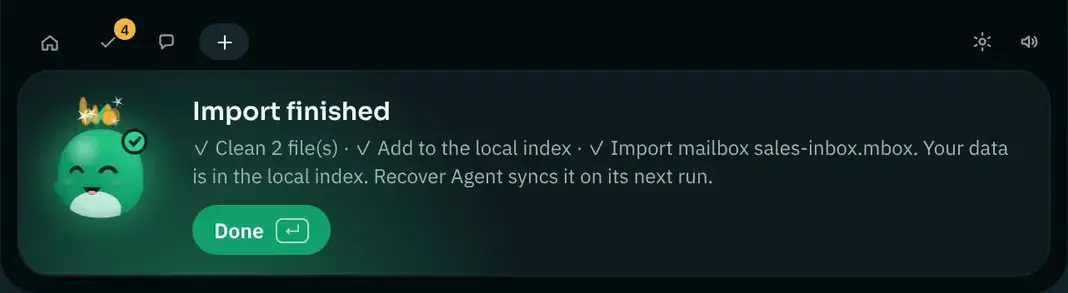
Recover scans quotes, invoices, payments, contracts and email threads. Each opportunity shows the amount, the days idle, a score, a confidence and the evidence rows behind it, so finance can check every number.
The five revenue leaks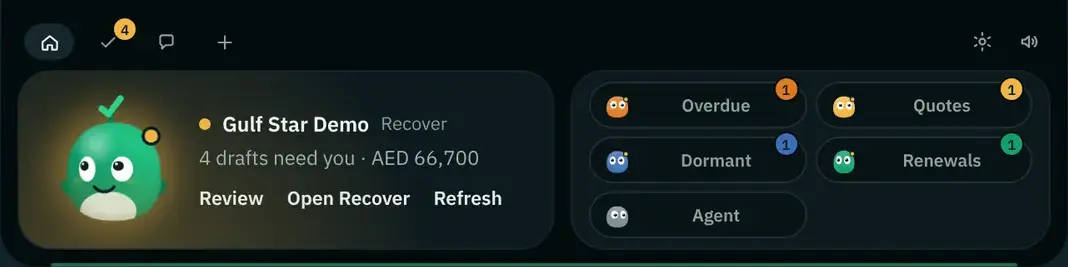
For each opportunity, Recover writes a short follow-up email using your Custom Skills. Ask the chat copilot "Which invoices are overdue?" and the answer comes with the draft ready.
Try the Skills demo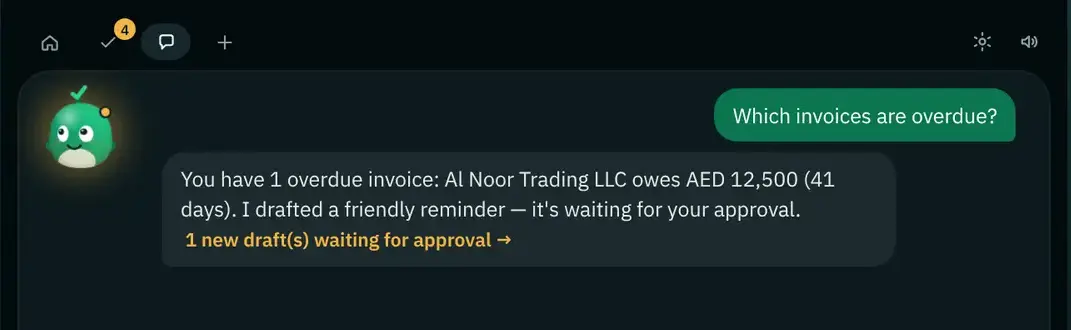
A named person approves, edits or rejects each draft. An unapproved send is refused by the system. Approved emails go out from your own mailbox with your signature, and you follow each one from sent to replied to won to paid.
How the approval gate works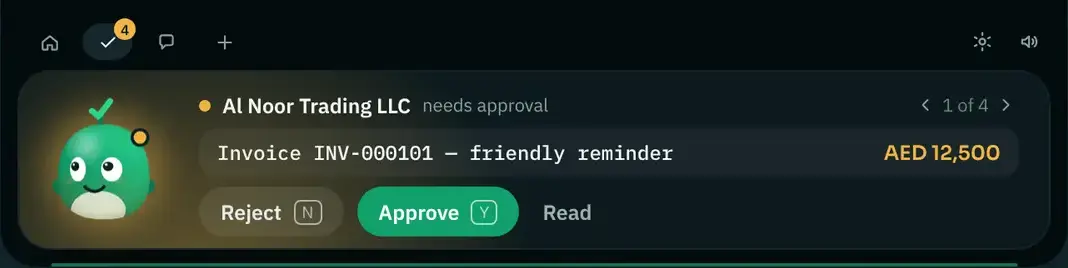
Try it yourself
This is how a draft reaches you. Read it, then approve, edit or reject. It is a simulation with example data: nothing is sent from this page.
Recovered (example)
AED 0
In Recover, value counts as recovered only when the payment is confirmed.
Hi Omar,
A friendly reminder that invoice INV-000101 for AED 12,500 is now 41 days past its due date. If payment is already on its way, please ignore this note.
Many thanks,
Ahmed, Gulf Star Trading
Evidence: INV-000101 · due 41 days ago · AED 12,500 still owed
Chapter 06 · People and AI
Recover does the searching, the remembering and the first draft. Your people do what only people can: the relationship, the judgment and the decision. Every follow-up gets better, and nobody spends the morning digging through inboxes.
What waits for you
Every draft across the team that needs approval, with the amount and the reason. Approve or reject with one key (Y / N) from the Companion.
Reva's briefing
"4 drafts need you · AED 66,700. The largest is a quote to Desert Rose Interiors, flagged because nobody replied in 36 days." (Example)
Your next draft
Nothing to write. Read, approve, move on. The email goes out from your own mailbox.
What waits for you
Forgotten quotes and unanswered enquiries, sorted by value, each with the email thread behind it.
Reva's briefing
"Desert Rose Interiors: QT-2026-031, AED 46,000, sent 36 days ago, no reply." (Example)
Your next draft
A short, friendly check-in that offers a call, already written in your tone.
What waits for you
Overdue invoices with the evidence rows: the invoice, the due date and any partial payments.
Reva's briefing
"Al Noor Trading LLC: INV-000101, AED 12,500, 41 days overdue." (Example)
Your next draft
A polite reminder in English or Arabic, in the multi-currency amount you invoiced.
What waits for you
Contract renewals near their end date and regular customers who have gone quiet.
Reva's briefing
Ask "What did Al Noor last order? What is still open?" and get the answer from live data before you pick up the phone.
Your next draft
A renewal or check-in email that sounds like you, with your signature.
Coming soon Personal coaching from each customer's history: what tone worked before and what to say next.
Custom Skills
Give Recover your company context once. It uses your data and your Skills in every scan and every draft. Try it: change the tone, the language or a rule, and watch the draft follow.
Recover does not build a new model from your data. It reads your Skills each time it writes.
More about Custom SkillsThe Custom Skills demo lets you pick a tone, a language, a leak type and a company rule, and see the follow-up draft change. It needs JavaScript.
Chapter 07 · Meet Reva
Reva is the Recover character. She lives in the Companion on your desktop and in chat, answers questions on live customer data and explains why each opportunity was flagged. She never approves or sends anything: every decision stays with you.


Reva's face on a round 1.85-inch touch screen, in a green body on a plinth that glows onto your desk. When something waits for approval she raises her right hand, shows a gold "!" and plays a chime.
The design is complete; no unit has been built yet. Reservation is free and non-binding. We email reservers first with the price and the date, before asking for any payment.
Reva P1 in detail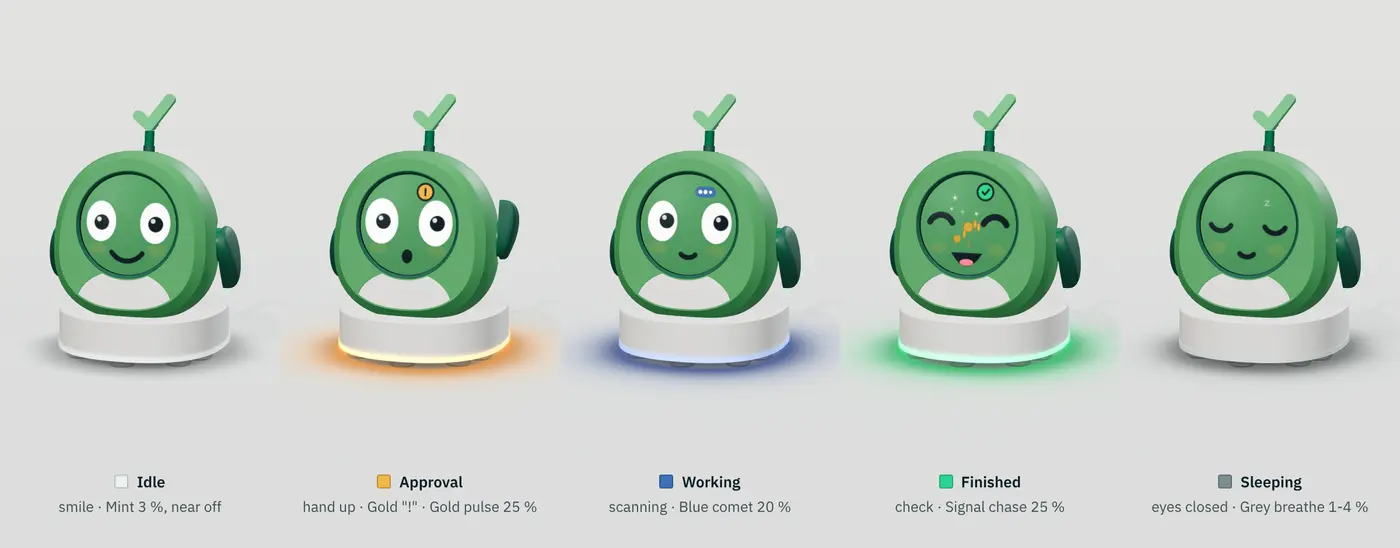
Free and paid
Eight things you can use today for free, and three plans when you are ready.
A Google Sheets template and 9 CSV files with headers.
For all five leak types, in English and Arabic.
The business cycle, why customers quit and what to do.
1,000 tokens, including a CSV Revenue Leak Audit.
The Windows desktop app, included with the trial and every plan.
Retention and follow-up playbooks.
Free and non-binding.
Starter
For an owner-led team that wants every quote and invoice followed up.
Growth Most popular
For growing sales and finance teams with several approvers.
Scale
For multi-team companies with high quote and invoice volume.
USD, paid by card through Stripe. Prices exclude VAT where applicable. Plans differ by monthly AI allowance, team size and support level.
Compare Recover plans and pricesFirst 1,000 companies
Submit your work email and we email you a personal code. One code per email, for first-time customers.
1,000 of 1,000 codes left · 0 claimed
All early-access codes are claimed. Thank you.
Trust by design
Recover is built for owners who are careful with customer relationships and with data.
An unapproved send is refused by the system. Every approval is logged with who approved it.
Each opportunity shows its reason, the evidence rows, a score and a confidence. Finance can check every figure.
Approved emails go out from your Gmail or Outlook with your signature and logo. Customers hear from you, not from a tool.
The Windows local agent indexes email and accounting exports on your own computer. Raw email stays on the device; only redacted records sync.
Export, delete or clear your data at any time. Traffic is encrypted in transit, and the database is encrypted at rest.
Card payments are handled by Stripe, so card numbers never touch Recover's servers. Admin sign-in supports single sign-on.
Questions
Recover is a follow-up layer between your mailbox, your books and your CRM. It finds money your business has already earned but is not collecting (forgotten quotes, overdue invoices, dormant customers, contract renewals and unanswered enquiries) and drafts the follow-up for a person on your team to approve.
No. Recover enhances your team. It finds the gaps and prepares the drafts, so your people spend their time on conversations instead of searching inboxes and spreadsheets. A named person approves, edits or rejects every draft.
Never. Nothing is ever sent without your approval. An unapproved send is refused by the system, every approval is logged with who approved it, and approved emails go out from your own Gmail or Outlook mailbox with your signature and logo.
Connect Gmail or Outlook, install the Windows local agent, or upload the free CSV data template with no mailbox access at all. Recover reads quotes, invoices, payments, contracts and email threads. With the local agent, raw email stays on your computer and only redacted records sync. You can export, delete or clear your data at any time.
Yes. The Recover interface is available in Arabic (right to left), English, German and French. Drafts are written in the tone and language you set in your Custom Skills, for example formal Gulf etiquette, Arabic or English per client.
Plans start at $99 per month, with a 14-day free trial and no overage charges, ever. Recover pricing, billing and trial questions.
The first 1,000 companies that leave their work email receive a personal code by email: 30% off your first 12 months on any plan. One code per email, for first-time customers. .
Reva P1 is a desk companion robot that raises her hand when something waits for your approval. It is a prototype in development: the design is complete and no unit has been built yet. Reserving is free and non-binding, and we email reservers first with the price and the date before asking for any payment. Reva never approves or sends anything. Reserve Reva P1.
More answers on pricing and billing and security, or ask a person.
Revenue you already earned. Recovered.
Claim 30% off as one of the first 1,000 companies, then start with the free trial whenever you are ready. Nothing is ever sent without your approval.
1,000 codes left